Dropdown menus let you organize chaos without overwhelming your audience. Imagine a restaurant menu with fifty items listed at once—overwhelming, right? A dropdown groups similar dishes under “Appetizers” or “Desserts,” making choices easy.
For a WordPress site, this means you can keep a simple navigation bar with just a few main links. Hover or click on “Services,” and boom—your ten sub-services appear in a sleek list. It’s elegant and efficient.
Why does this matter? Because visitors judge your site in seconds. A cluttered header can make them bounce faster than a scared cat. Dropdowns boost usability, which keeps people exploring.
How Does It Work in WordPress?
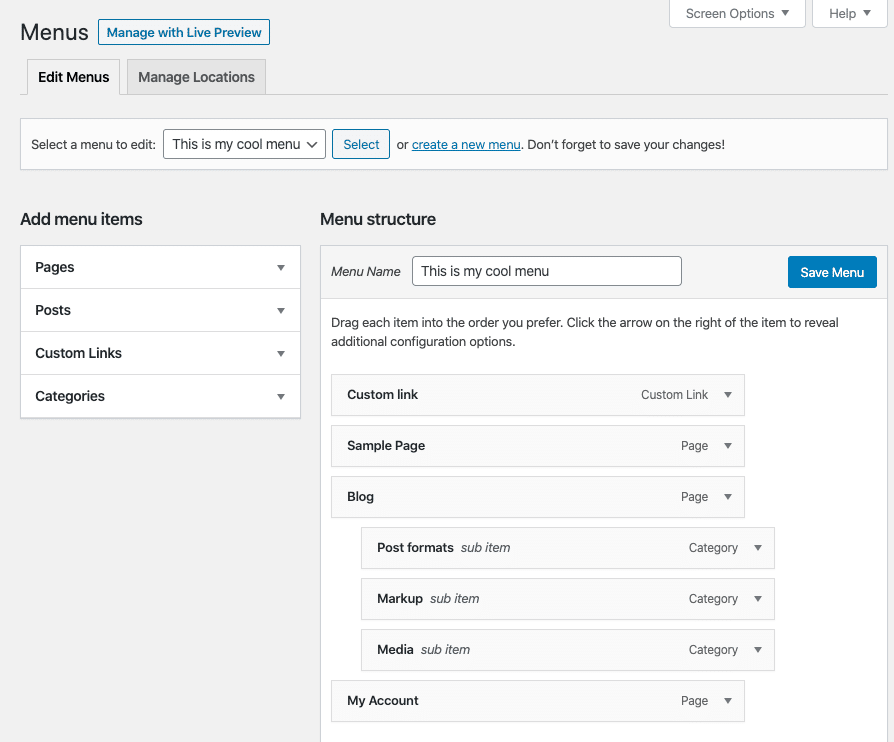
WordPress makes dropdowns ridiculously easy to set up. In your dashboard, go to Appearance > Menus. You’ll see a list of pages, posts, or custom links you can add.
Just drag a menu item slightly to the right under another item. That little indent tells WordPress, “Hey, this page is a child of the parent above.” Save the menu, and you’ve got a working dropdown. No coding? No problem.
If you’re using a block-based theme or a page builder like Elementor, the process is similar. You’ll often find a drag-and-drop interface that feels like playing with digital Lego blocks. Anyone can do it.

