
Let’s get the harsh truth out of the way first. You cannot disable alerts from the President, the National Weather Service for imminent threats, or an AMBER Alert for a child abduction. The Federal Communications Commission (FCC) mandates these as non-negotiable. Think of it as your phone’s one-size-fits-all emergency whistle. It’s loud, annoying, and legally required.
But don’t throw your phone against the wall yet. The good news? You can absolutely murder the volume on everything else. Those test alerts? The severe thunderstorm warnings for a county you don’t live in? The “Public Safety” messages from your local police? Those are your digital puppets, and you hold the strings.
Step One: Find the Settings Dungeon
Grab your phone. I’ll wait. Tap, tap, tap. Are you back? Good. The path is different on every phone, but it usually lives under Settings > Notifications. Look for a section labeled “Government Alerts,” “Emergency Alerts,” or “Wireless Emergency Alerts.” It’s often buried near the bottom of the notification list, like that rogue sock you find behind the dryer. Don’t give up—it’s there.
If you have an iPhone, check Settings > Notifications > scroll to the very bottom. Android users, you might find it under Settings > Safety & Emergency or by searching “emergency alerts” in the settings search bar. Yes, the search bar is your friend—use it before you rage-tap every menu.
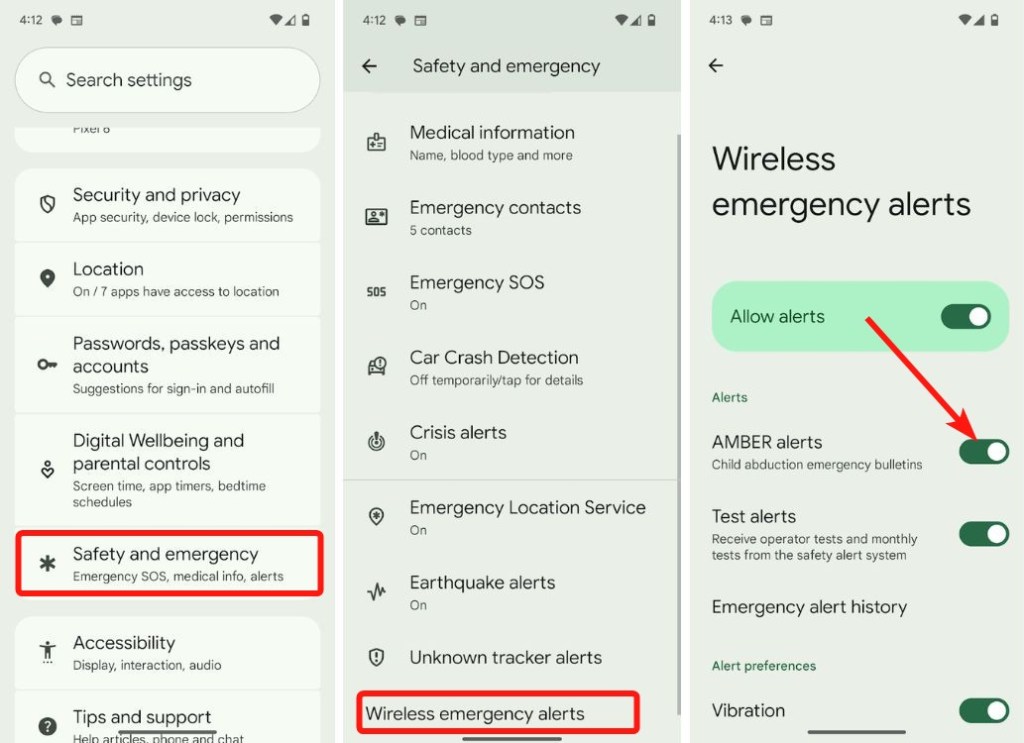 How to Turn Off Amber Alerts on Android | Beebom

