
First, you have to wake your iPhone up. Give that home button a firm, satisfying press. It’s the same button you’ve pressed a million times to get back to your cat photos.
Now, find the app that’s overstayed its welcome. Maybe it’s that diet app that keeps sending you notifications at 10 PM. Or that game where you’re stuck on level 4 and you’ve convinced yourself the developer hates you.
Here’s the magic part: press and hold your finger on that app’s icon. Don’t just tap it. Squeeze it. Give it a good, long, angry stare. After a second or two, every single icon on your screen will start wibbling.
Yes, wibbling. It’s the technical term. They all shiver like you just told them a ghost story. A tiny little “X” will appear in the corner of the app you’re holding. It’s the app’s white flag of surrender.
Tap that “X.” A pop-up will ask if you’re sure. You’ve never been more sure of anything in your life. You tap “Delete,” and poof. It vanishes. The ghost of that app is finally gone from your home screen.
You then press the home button again. The wibbling stops. Order is restored. Take a deep breath. You just did manual labor for your phone.
The Lazy Genius Way: Settings Shenanigans
But what if you’re really lazy? What if you’re lying in bed, holding your phone with one hand, and your other hand is busy holding a burrito? I respect that. Totally.
There’s a second way, and it involves zero finger gymnastics. Go into your Settings app. It’s the one with the grey gears. It looks like a control panel for a very boring spaceship.
Scroll down until you see General. Tap it. Then, scroll down again until you see iPhone Storage. This is the digital version of looking in your fridge to see what’s expired.
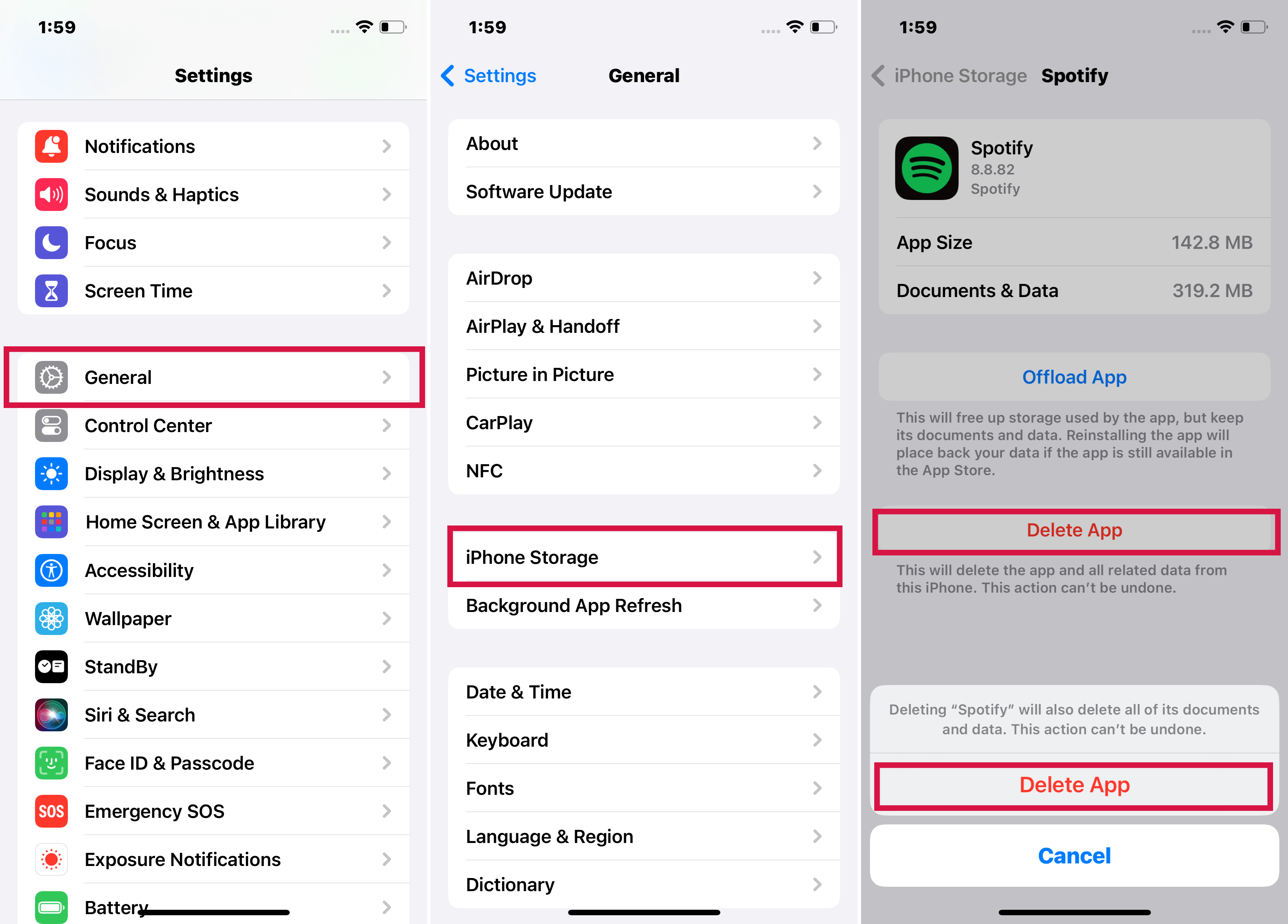 iPhone Running Slow? Here's How to Speed It Up!
You’ll see a list of all your apps, sorted by how much space they’re hoarding. That video editing app you used once to make a 5-second clip of your dog? It’s taking up 2 gigabytes. That’s digital real estate theft.
Tap the app you want to evict. Then, tap “Delete App.” It’s that simple. No wibbling. No holding. Just pure, cold-blooded deletion from a menu. It feels very corporate, but it works.
A quick note: Both methods do the same thing. They remove the app and all its data. So if you’re deleting a game, say goodbye to your high score. That’s the price of a clean home screen.

