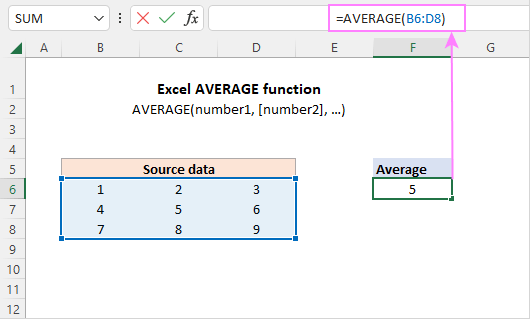
First off, Excel was practically built for this. It’s like having a math wizard who never sleeps, sitting right on your computer. You just point, click, and boom—the average appears.
But why should you care? Because averages help us make sense of messy data. Think of it like smoothing out the wrinkles in a bedsheet: suddenly, everything looks neat and manageable.
The Classic ‘AVERAGE’ Function
Let’s cut to the chase. The simplest way is with the AVERAGE function. Click an empty cell, type =AVERAGE(, then highlight the numbers you want to include. Close the parenthesis, hit Enter, and voilà.
It’s like telling Excel, “Hey, take all these numbers, add them up, and divide them by how many there are.” And it does it instantly. No calculator needed, no tapping your chin in confusion.
What About Blanks or Errors?
Here’s where it gets really cool: Excel is smart about empty cells. If you have a blank cell in your list, Excel ignores it entirely. It won’t count it as a zero, which would mess up your average.
But what if there’s a typo or an error? Say you typed a word like “oops” by accident. Excel will stop and throw an error too. No worries—just clean that up, and you’re golden.

